
New in PIAS: CPU Benchmark and Thread Insight
Modern computers often have many CPU cores — sometimes 16, 20 or even more. But how many of those cores are actually used by PIAS? And how efficiently?
With the built-in benchmark function in PIAS, you can now measure the real performance of your processor and immediately see how many threads your PIAS license allows you to use.
Many computationally intensive PIAS tasks are distributed across multiple cores. More threads generally mean shorter calculation times. However, your PIAS license may limit the number of threads that can be used simultaneously. For example, your workstation might have 20 logical cores, while your current license allows only 2 threads.
The benchmark makes this transparent.
You can find the benchmark in all PIAS modules via:
Setup → Program Setup → Performance settings → Run benchmark
In the same menu, “Available threads for PIAS” shows how many threads your license permits. You can also manually set a lower limit if desired.
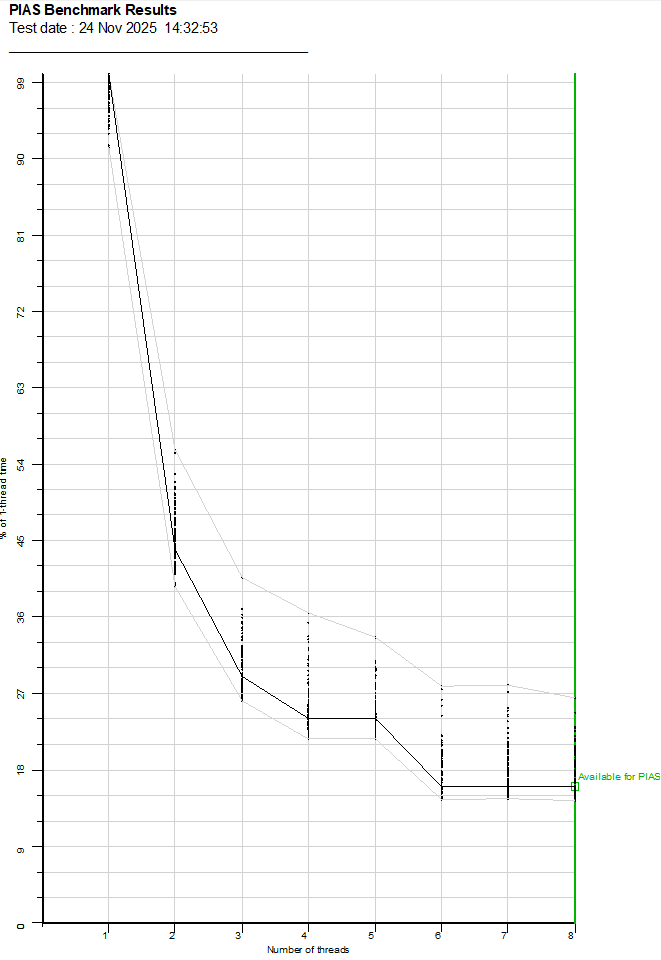
The benchmark runs a series of heavy calculations using the same principles as real PIAS workloads. After completion, it generates a report with:
- System and CPU information
- Number of physical and logical cores
- Threads allowed by the PIAS license
- Speedup and efficiency per thread count
- A scalability graph including license and user limits
This allows you to see immediately:
- How well your CPU scales
- Whether your hardware is fully utilized
- Whether calculation time is limited by hardware or by license
We recommend running the benchmark when installing PIAS on a new system, after a hardware upgrade, or when evaluating performance differences between workstations.
With the PIAS benchmark, you gain clear insight into your available computing power — and how effectively PIAS is allowed to use it.
More info: https://www.sarc.nl/images/manuals/pias/htmlEN/general.html#performance_settings
